
Use a credit note to correct amounts on an issued invoice. It preserves the relationship between the original document and the adjustment. A refund is a separate event: it records money returned to the client after a credit creates an available credit balance.
Create the correction
- Open the issued invoice, or an invoice with a recorded payment.
- Choose More, then Create credit note.
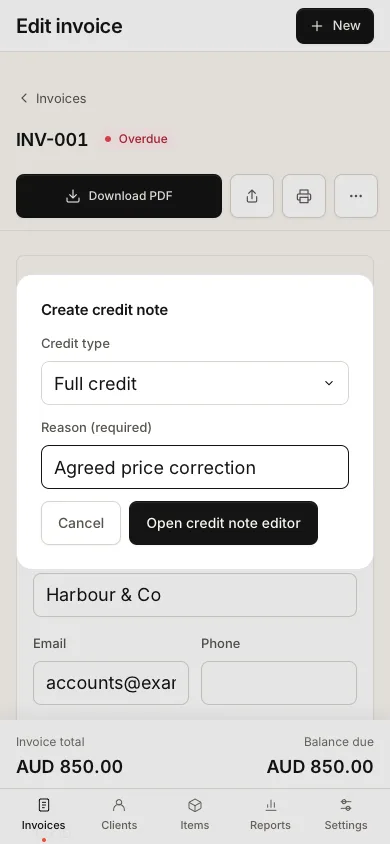
- Choose Full credit or Partial credit under Credit type. For a partial credit, select lines and quantities or enter Custom total credit amount (overrides selected lines).
- Enter Reason (required), then choose Open credit note editor.
- Review the lines and linked invoice, then choose More, Mark sent to issue the note. Its status becomes Issued.
The credit note has its own number using Credit note prefix. A draft note does not have the same financial effect as an issued one. Check the original invoice's balance after issuing the adjustment.
Record money returned
- Open the issued credit note linked to the original invoice.
- Choose More, then Record refund.
- Enter the refund amount, date and method.
- Review the available credit balance and save the refund record.
The refund must be positive and cannot exceed the available credit balance. The supported flow records a refund against an issued linked credit note. It does not initiate a transfer from your bank or automatically refund a Stripe transaction.
Good to know
Use a reason your client will understand, such as a cancelled service or an agreed price correction. Do not remove a legitimate received payment merely to reduce the invoice balance: that loses the record of money actually received.
Credit notes count towards the shared 100-document beta limit. Their issue dates and refund dates also affect report calculations. When comparing reports to an earlier export, check whether a credit was only drafted, later issued or subsequently refunded.
Keep the original invoice, credit note and payment evidence together. If a correction seems to increase rather than reduce a balance, review the linked document and amounts before issuing another note.